
Integrate Cart Management and Checkout Initiation in Shopping Muse
Note: This Shopping Muse e-commerce integration is undergoing a gradual rollout, and integration details might change in the coming months.
Cart management and checkout initiation enable Shopping Muse to help shoppers move from product discovery to purchase without leaving the conversational experience.
Dynamic Yield supports the Universal Commerce Protocol (UCP) for cart management. The merchant APIs described in this article are based on the UCP Shopping Cart specification.
The integration has two parts:
- A one-time setup that connects Shopping Muse to your e-commerce backend and checkout page
- A runtime implementation that sends the shopper’s active cart context in Shopping Muse API calls
Integration overview
Storefront or backend
        |
        | Shopping Muse request + cart ID
        v
   Shopping Muse
        |
        | GET /carts/{id}
        | PUT /carts/{id}
        v
Merchant cart API
        |
        | Optional middleware
        v
Commerce platform
If your commerce platform doesn't support the required API contract directly, use middleware to translate between the Shopping Muse contract and the platform's native cart APIs.
Prerequisites
- Shopping Muse is implemented on your site or app.
- Your e-commerce backend exposes cart APIs that can retrieve and update a cart by cart ID.
- Your e-commerce API supports the request and response structure described in this article, either natively or through middleware.
- The shopper's active cart ID is available wherever the Shopping Muse request is constructed:
- For a client-side implementation, the cart ID must be available in the storefront/browser.
- For an API implementation, the cart ID must be available to the backend making the Shopping Muse request.
- Product IDs used by your commerce platform can be mapped to the SKU used in your Dynamic Yield product feed.
Configure e-commerce actions in Shopping Muse
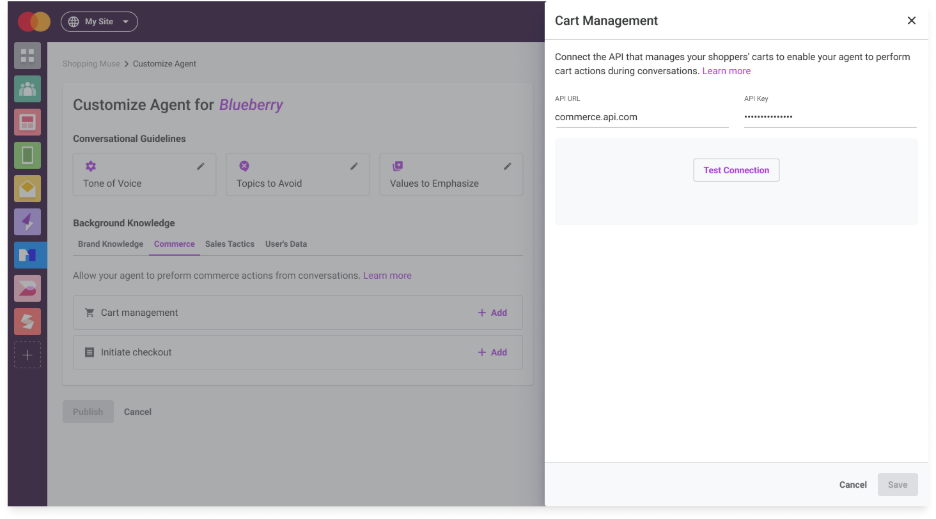
This is a one-time account setup. Configure your cart management so that Shopping Muse can call your e-commerce backend when the shopper asks to view the cart, add an item, update a quantity, or remove an item.
Cart management
Provide the e-commerce actions API base URL. This is the base URL of the e-commerce API or middleware that supports the required cart actions.
If your e-commerce API requires authentication, provide an API key. Shopping Muse sends the configured key in the x-api-key request header.
Your API must also expose a health endpoint that Dynamic Yield uses to verify the connection.
Health check
Route: GET /health
Input: No request body is required.
Response: Return HTTP 200 when the service is available.
The health endpoint is used by Dynamic Yield to verify connectivity to the configured e-commerce actions API.
Get cart
Route: GET /carts/{id}
Input: Pass the cart ID as the id path parameter. No request body is required.
Response: Return the current cart. The response must include cart_id, line_items, and total_estimate. Each line item must include cart_id, item.id, item.title, quantity, and price.
Example:
{
  "cart_id": "cart_12345",
  "line_items": [
    {
      "id": "line_123",
      "item": {
        "id": "SKU_123",
        "title": "Product_name"
      },
      "quantity": 1,
      "price": {
        "amount": "129.00",
        "currency": "USD"
      }
    }
  ],
  "total_estimate": {
    "amount": "129.00",
    "currency": "USD"
  }
}
Additional UCP cart fields can be returned as supported by your commerce implementation.
Update cart
Route: PUT /carts/{id}
Input: Pass the cart ID as the id path parameter. The request body must include line_items, with each line item containing item.id, item.title, and quantity.
In accordance with the UCP Cart specification, an update is a full replacement of the cart contents. Shopping Muse sends the complete desired line_items state, not only the item being added, changed, or removed.
For example, if the current cart contains SKU_123 and Shopping Muse adds SKU_456, the update request contains both items:
{
  "line_items": [
    {
      "item": {
        "id": "SKU_123"
      },
      "quantity": 1
    },
    {
      "item": {
        "id": "SKU_456"
      },
      "quantity": 1
    }
  ]
}
The commerce platform should remain the source of truth for the resulting cart state, including inventory or other merchant-side adjustments.
Response: Return the same response structure as GET /carts/{id} .
Example:
{
  "cart_id": "cart_12345",
  "line_items": [
    {
      "id": "line_123",
      "item": {
        "id": "SKU_123"
      },
      "quantity": 1,
      "price": {
        "amount": "129.00",
        "currency": "USD"
      }
    },
    {
      "id": "line_456",
      "item": {
        "id": "SKU_456"
      },
      "quantity": 1,
      "price": {
        "amount": "49.00",
        "currency": "USD"
      }
    }
  ],
  "total_estimate": {
    "amount": "178.00",
    "currency": "USD"
  }
}
Product IDs
item.idin an update request represents the product SKU used by Dynamic Yield. Shopping Muse validates the updated cart against the SKU values it requested. For products added or updated by Shopping Muse, return the same SKU value initem.id.If your commerce platform uses a different identifier, map between the Dynamic Yield SKU and the platform-specific identifier in your API or middleware.
For example, a Shopify implementation might map:
Dynamic Yield SKU:
28125559226446

Shopify Product Variant ID:
gid://shopify/ProductVariant/28125559226446

Returned to Shopping Muse:
28125559226446
The same principle applies to other commerce platforms that use a different product identifier format.
Cart IDs can also require platform-specific mapping. Preserve the complete cart ID provided to Shopping Muse, including any platform-specific key or suffix required to access the cart.
Error handling
Merchant business conditions should be returned using UCP messages. Each message must include type and code; content and severity can be included when applicable.
Example:
{
  "messages": [
    {
      "type": "error",
      "code": "out_of_stock",
      "content": "The item is currently out of stock.",
      "severity": "recoverable"
    }
  ]
}
Shopping Muse supports the following merchant business error codes:
| Code | Use when |
|---|---|
not_found | The cart does not exist or has expired. |
item_unavailable | The item or SKU does not exist or can't currently be purchased. |
out_of_stock | No inventory is currently available. |
quantity_invalid_limit_exceeded | The requested quantity exceeds the allowed maximum. |
quantity_invalid_minimum_not_met | The requested quantity is below the required minimum. |
item_ineligible | The item can't be sold through this flow. |
Return all relevant messages when more than one condition applies. If you provide a supported UCP severity, Dynamic Yield preserves it.
Business conditions can be returned with HTTP 200 when the merchant request itself was successfully processed. For transport or integration failures, return the appropriate HTTP status, such as 401/403, 400/422, 429, or 5xx. Dynamic Yield handles and normalizes these failures internally.
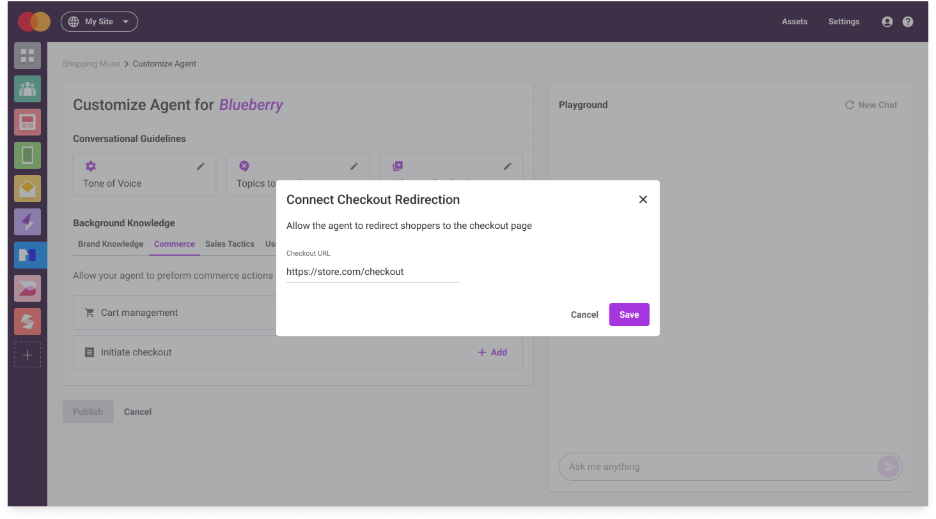
Initiate checkout
Provide the checkout page URL that Shopping Muse uses when the shopper asks to check out. The checkout page must resolve the shopper’s active cart using the cart context passed to Shopping Muse at runtime.
Send cart context in Shopping Muse API calls
At runtime, Shopping Muse needs the shopper’s active cart ID to perform cart management and checkout actions on the correct cart.
The cart ID is passed to Shopping Muse as commerce.cart_id.
Out-of-the-box Shopping Muse template
If you use the out-of-the-box Shopping Muse template, store the active cart ID in the browser's sessionStorage under the key cart_id.
For example:
sessionStorage.setItem("cart_id", "cart_12345");The template reads this value and includes it as commerce.cart_id in requests to Shopping Muse.
Update the stored value if the active cart changes during the session.
Shopping Muse API implementation
If you call the Shopping Muse API directly, include the active cart ID in the commerce object as part of the Shopping Muse API request:
{
  "commerce": {
    "cart_id": "cart_12345"
  }
}
The rest of the request follows the standard Shopping Muse API request schema.
Without commerce.cart_id, Shopping Muse can't retrieve or update the cart or initiate checkout.
Operational and security recommendations
- Expose the e-commerce actions API over HTTPS.
- Keep API keys and commerce-platform credentials server-side.
- Validate the
x-api-keyheader on cart API requests. - Keep
GET /healthavailable so Dynamic Yield can verify the connection. - Treat cart IDs as opaque values and preserve the complete ID when passing it between systems.
- If a cart ID contains sensitive information, such as a platform-specific key, redact it from logs.
- Return the actual cart state produced by your commerce platform after an update rather than echoing the requested cart.
Validate the integration
Before launch, validate the complete shopper flow in a staging environment:
- Set the commerce integration in the Shopping Muse App and validate it.
- Start a Shopping Muse conversation with an active cart.
- Ask to view the cart.
- Add a recommended product.
- Update the quantity of an item.
- Ask to view cart and validate the item and quantity match your requests
- Remove an item.
- Ask to view cart and validate it is empty
- Test a merchant business condition such as insufficient inventory.
- Continue to checkout.
Confirm that each action operates on the correct cart, returns the latest cart state, and sends the shopper to the expected checkout page.
When validating an update, also confirm that the item.id returned for an added or updated product matches the SKU Shopping Muse sent in the update request.
Updated 25 days ago