
Client-side Recommendation APIs
Use the Dynamic Yield client-side recommendation APIs to request recommendation results without Dynamic Yield rendering them. The API returns product data in JSON format, so you control how the recommendation is rendered instead of serving it through an Experience OS recommendation campaign.
You can also pass real-time filters based on data collected during the current session. For example, you can request products priced higher than the currently viewed product or products that match a visitor's explicit selection.
We recommend calling the API from within a Custom Code campaign variation. This setup enables you to test the implementation, use a control group to measure its impact, and target different recommendation strategies to different audiences without changing your site code.
Create a strategy to call via API
-
In Experience OS, go to Assets › Strategies.
-
Create or edit a recommendation strategy.
-
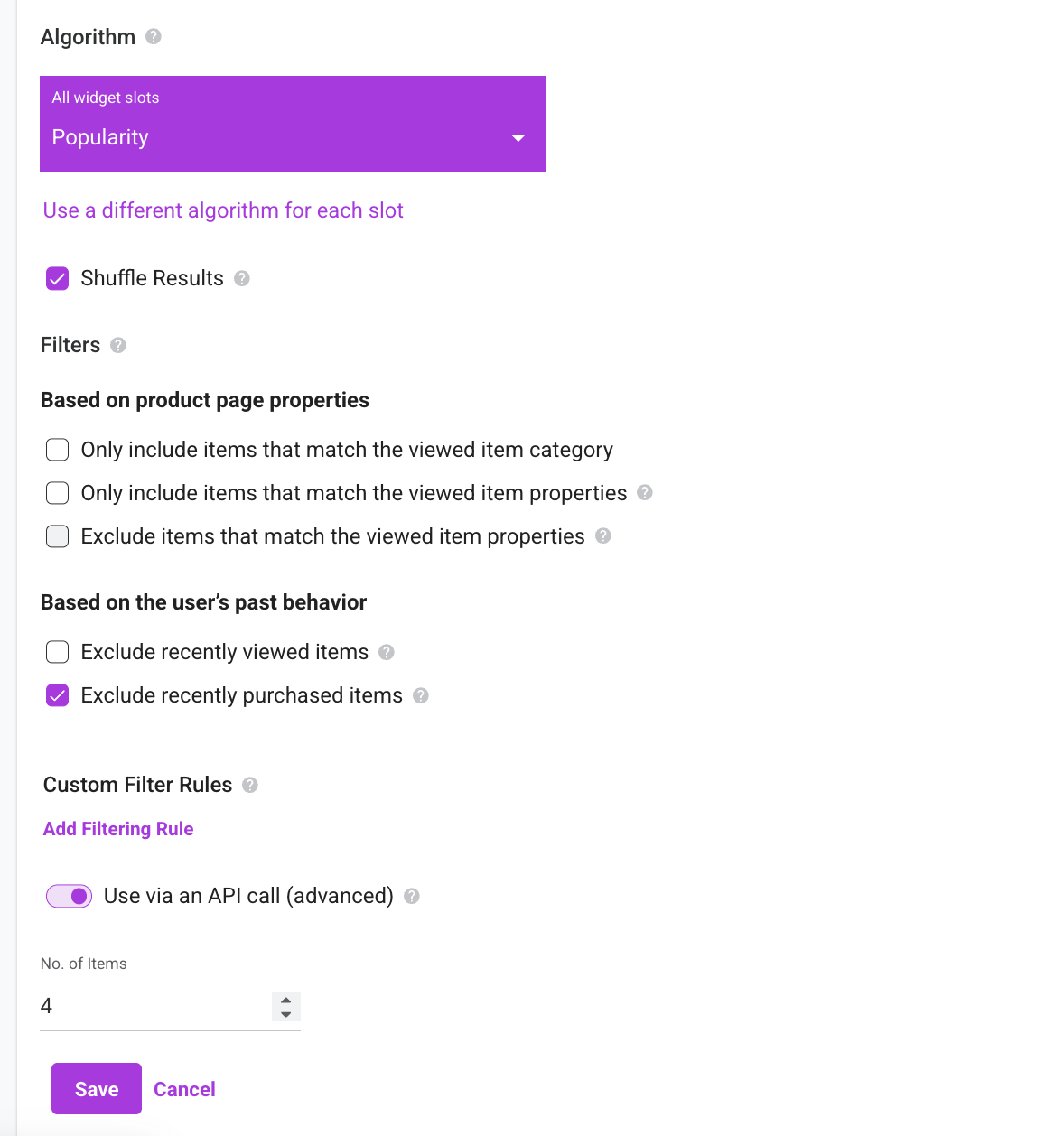
In the strategy settings, turn on Use via an API call (advanced) and enter the number of items to return.
-
Save the strategy.
In the Strategies page table:
-
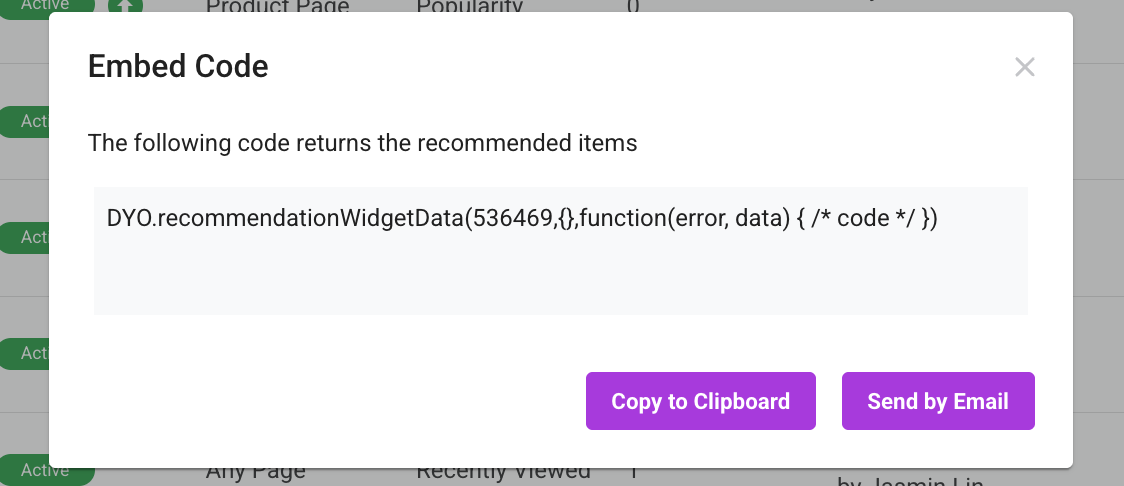
From the strategy's More options menu, select Embed code, and copy the API snippet.
-
Edit the API as described in the following sections.
-
Paste the code into a Custom Code campaign to execute it for qualifying visitors.
-
Register the rendered elements so Dynamic Yield can track recommendation performance. For details, see Register the rendered recommendation.
Request recommendation data
Use DYO.recommendationWidgetData() to request recommendation results for a strategy.
Syntax
DYO.recommendationWidgetData(id, opts, callback);Parameters
id
idThe ID of the recommendation strategy.
Type: number
opts
optsAn optional object containing the request configuration.
Type: object
The object supports the following properties:
| Property | Type | Description |
|---|---|---|
context | object | Overrides the context detected on the current page. If you don't include this property, Dynamic Yield uses the current page context. |
maxProducts | number | Overrides the number of items configured in the recommendation strategy. |
exclude | object | Specifies SKUs or group IDs to exclude from the results. This property is commonly used to prevent the same item from appearing in multiple recommendation widgets on the same page. It isn't supported for Recently Viewed strategies. |
realtimeRules | array | Apply real-time filter rules based on data obtained during the current session. |
distinct | boolean | When set to true, excludes SKUs returned by other recommendation widgets on the current page. |
callback
callbackThe function to run after Dynamic Yield processes the request.
Type: function
The callback receives the following arguments:
| Argument | Description |
|---|---|
err | Contains error information if the request fails. |
data | Contains the recommendation response if the request succeeds. |
Example request
The following example requests recommendations for strategy 12345, excludes three group IDs, and provides a product page context:
DYO.recommendationWidgetData(
  12345,
  {
    exclude: {
      group_id: ["127829", "1217317", "1247581"]
    },
    context: {
      lng: "en_GB",
      type: "PRODUCT",
      data: ["1253851-001"]
    }
  },
  function (err, data) {
    if (err) {
      // Handle the error.
      return;
    }

    const recommendationData = data;
  }
);
Example response
The callback's data argument contains the recommendation response.
{
  "wId": 3197,
  "name": "TOP_N",
  "expData": {
    "varId": null,
    "expId": null
  },
  "fId": 543,
  "fallback": true,
  "slots": [
    {
      "item": {
        "entity_id": "330367",
        "sku": "6510120",
        "group_id": "33112327",
        "name": "tropical flower dress",
        "description": "the best tropical flower dress in the universe",
        "price": 199,
        "in_stock": true,
        "categories": [
          "women",
          "dresses"
        ],
        "url": "https://www.example.com/products/tropical-flower-dress",
        "image_url": "https://www.example.com/images/tropical-flower-dress.jpg"
      },
      "fallback": true,
      "strId": 1,
      "md": {}
    },
    {
      "item": {
        "entity_id": "330368",
        "sku": "6510145",
        "group_id": "33112347",
        "name": "tropical flower pants",
        "description": "the best tropical flower pants in the universe",
        "price": 89,
        "in_stock": true,
        "categories": [
          "women",
          "pants"
        ],
        "url": "https://www.example.com/products/tropical-flower-pants",
        "image_url": "https://www.example.com/images/tropical-flower-pants.jpg"
      },
      "fallback": false,
      "strId": 1,
      "md": {}
    }
  ]
}
Recommendation response properties
The response includes the following tracking values:
| Property | Description |
|---|---|
wId | The widget ID. Use this value for the rendered element's data-dy-widget-id attribute. |
fId | The feed ID. Use this value for the rendered element's data-dy-feed-id attribute. |
slots | The products returned by the recommendation strategy. |
slots[].item | The product data from the feed. The properties depend on the fields available in your product feed. |
slots[].item.sku | The product SKU. Use this value for the product element's data-dy-product-id attribute. |
slots[].strId | The strategy type for the slot. Use this value for the product element's data-dy-strategy-id attribute. |
slots[].fallback | Indicates whether the slot was populated by a fallback strategy. |
fallback | Indicates whether at least one slot was populated by a fallback strategy. |
Apply real-time filter rules
Use the realtimeRules property in the opts object to filter recommendation results based on data obtained during the current session.
For the supported rule structure and examples, see Return Recommendations Real-time Filter Data.
Register the rendered recommendation
After rendering the returned products, register the recommendation elements so Dynamic Yield can track their performance.
Syntax
DYO.recommendations.registerElements(el);The el argument is the DOM element containing the recommendation widget.
Add tracking attributes
Add the response values to the rendered DOM elements:
<div
  data-dy-widget-id="3197"
  data-dy-feed-id="543"
>
  <div
    data-dy-product-id="6510120"
    data-dy-strategy-id="1"
  >
    <!-- Rendered product content -->
  </div>

  <div
    data-dy-product-id="6510145"
    data-dy-strategy-id="1"
  >
    <!-- Rendered product content -->
  </div>
</div>
Map the response properties to the DOM attributes as follows:
| DOM attribute | Response property |
|---|---|
data-dy-widget-id | wId |
data-dy-feed-id | fId |
data-dy-product-id | slots[].item.sku |
data-dy-strategy-id | slots[].strId |
Register the element
After adding the widget and product elements to the DOM, pass the widget container to registerElements():
const widgetElement = document.querySelector(
  '[data-dy-widget-id="3197"]'
);

DYO.recommendations.registerElements(widgetElement);
Run this call after the recommendation elements are present in the DOM.
Get loaded recommendation widgets
Use DYO.recommendations.getLoadedWidgets() to retrieve the responses of all recommendation widgets loaded on the current page.
Syntax
DYO.recommendations.getLoadedWidgets();Example
const loadedWidgets = DYO.recommendations.getLoadedWidgets();The method returns an array containing the recommendation widget responses loaded on the page.
Updated 3 months ago